Cari Blog Ini

Tampilkan postingan dengan label review. Tampilkan semua postingan

Minggu, 12 Agustus 2012

Uniblue Driver Scanner : How to Easily Update PC Drivers

0 komentar | Read more...

Driver Scanner is one product from Uniblue software utility that moves in and maintenance of computer systems. Driver Scanner is a utility that sendiry specifically used to check your computer drivers are already out of date (older).

Driver itself is a device used by the operating system that can recognize the hardware (hardware) installed and used by the computer, so it can function properly. That is why without a driver, the system does not recognize the hardware installed on the computer. For example, a printer, we can not use the printer before the printer driver is installed from the system.

However, as time goes on the driver and the computer will crash bug (error) so that the installed hardware does not run properly. That is one reason why we need to update hardware drivers. Other reasons include the need for updated drivers:
  • Optimizing the performance of PC hardware
  • Cure a bug in the previously driver
  • Hardware that was not previously recognized by the computer will be recognized so that it can function
  • Reduce the crash that would occur on PC hardware
Actually, Windows already provides a feature to update the drivers for your computer hardware. However, you must do it manually one by one and check whether the necessary updates. For the novice user, this will be very inconvenient and takes a long time.


Uniblue Driver Scanner is present to resolve the issue in a way that is simple. With the appearance of a user friendly program, users can simply press a button to check the driver and do the update. In addition, the availability of the system restore feature that allows you to cancel the action if a desired time.

For more information, please visit the official website at

Paint.NET : Powerfull Free Image Editor

2 komentar | Read more...

Paint.Net is a sample of free image editor that have professional like image editor. It’s inofative interface with complete features have it’s value for this freeware software.

Main Features :
Layer
If you often use professional imagge editor, like Adobe Photoshop you must have been know this name. Layer is a panel that have function to organize depth of each object in canvas (area editing in Paint.NET). This feature is very useful, so each image or object drawn will not overlap object behind it.

Special Effect
Even more surprising than this image editor is a rich assortment of effects such as blur, distort, noise and render. Which is a feature I faforit effect to convert images to be like a pencil sketch, ink sketches and paintings. For a free image editor, this feature can be spelled out very cool.


Tools
The availability of this standard tool available in any image editor software is required, including in Paint.NET. Tools that are available include Select to select some or all areas of the image, Text to insert text in the image, zoom to enlarge or reduce the image on the screen and so on.


Unlimited History
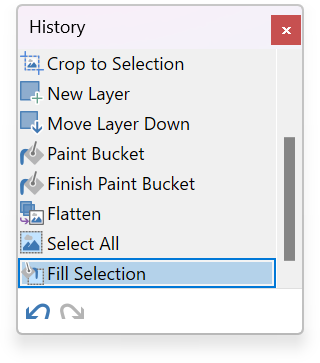
Each editor would ever make a mistake while editing the image or change their mind and want to restore the image to the previous condition. Paint.NET has this feature as it’s one of the mainstay for most other image editors to limit the amount of history, so the cancellation is only possible to some extent, not like this software that gives unlimited flexibility in editing the cancellation problem. But of course the limits of history relies on the free space on your hard drive.
Automatic Update
To update this software, you do not need to check it manually by visiting the site, because when you connect to the internet the software will automatically check if there is already the newest version. If there is a new version of this software then you will receive notification and suggest to download the update of this software.

For more information, you can visit : http://www.getpaint.net .

Piriform CCleaner : Free but Powerful

0 komentar | Read more...

Who is not familiar with this software? Perhaps for those of you who do not know, I'll give a little review about this software.

CCleaner is a software (software) which is one of the Piriform products. This software has the primary function of cleaning the junk on the computer and fix the registry to its conclusion. In addition there are additional features of the tools that might be useful.

Junk Cleaner
True history, browser cache and cookies left after we surf the internet and logging on to certain sites is not a waste, but to simplify and speed up access when we want to reopen the sites you have visited. But sometimes history, cache and cookies left behind it a trail that can be tracked by others who use the same computer to find the username and password from your account at a particular site. Therefore, the removal of trash like this can sometimes be very important. But do not worry, you can arrange anything you think is junk and delete it and do you not litter and do not need to be removed.


Fixing Registry
Registry can be described as the heart of your Windows operating system, so the remains of garbage registry of applications that have been removed (to uninstall) sometimes remains on the registry and if left unchecked will interrupt the performance of your computer system, and potentially slow. This registry cleanup needs to be done periodically.

Additional Tools
Besides these two main features on CCleaner also has features such tambahas Uninstall Tool to remove (uninstall) the application is not desirable. Managing a system restore to a restore point and delete the unwanted. There is also a feature that requires caution before using it, the Wiper Drive. This tool is useful for removing freespace (blank space) on a hard drive or even delete the entire contents of the hard drive. There is one more feature that is Startup Manager, it serves to set the program you want to run the first time the computer starts and removes unwanted, so as not to burden the startup process can be fairly heavy.


Conclusions
CCleaner is a lightweight software that can be fairly complete for mengoptmalkan your computer system, which is also supported with additional features which are quite useful. And best of all is this free software (freeware), but you can make a donation for this software via the official website at http://www.piriform.com/  .

Members